

If you create long form content, YouTube tutorials, podcast style videos, screen recordings, webinars, even simple talking head videos, you already know that turning one video into multiple short clips takes forever.
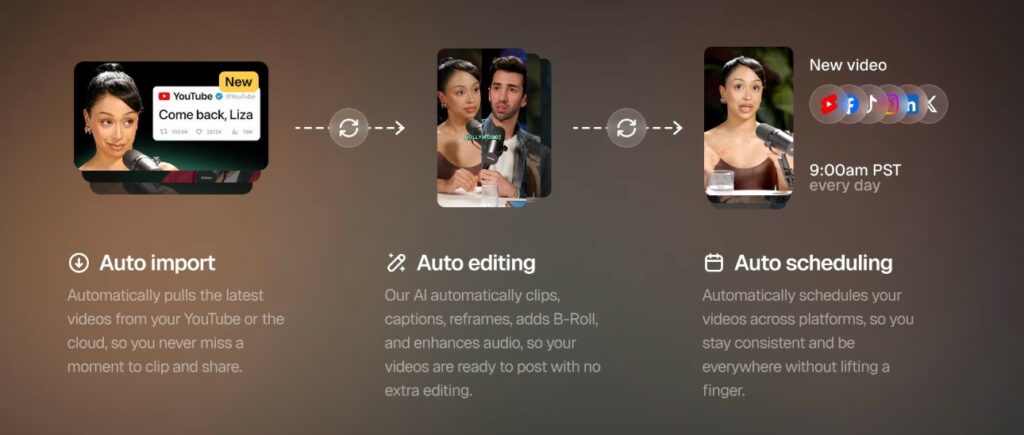
That is the whole promise of OpusClip. You upload a long video (or import from different sources), and it finds moments that can work as short form clips. Then it reframes the video for vertical, adds captions, and even lets you auto post to platforms like YouTube Shorts, TikTok, and Instagram Reels.
So in this review, I’m going to walk you through what it does well, what you still need to do manually, who should use it, and which plan makes the most sense.
Quick verdict
If you are an affiliate marketer who is already recording videos (or you plan to), OpusClip can save a lot of time. It is best for people who want consistent short form content without learning complex editing.
If you hate the idea of reviewing clips before posting, or you want total creative control over every cut, you may find it frustrating. It is an AI helper, not a replacement for your judgment.
Table of Contents
Affiliate Disclaimer: This site contains affiliate links, which means I may earn a commission on purchases made through these links at no extra cost to you.
What is OpusClip?
OpusClip is an AI video clipping and editing tool designed to turn long videos into short clips quickly. The platform highlights moments, generates clips, and ranks them with a Virality Score so you can start with the clips it thinks have the best chance of performing well. It also includes caption styles, reframing for multiple aspect ratios, and tools that speed up cleanup like filler and silence removal.
Why affiliate marketers like this type of tool
Most affiliate marketers do not need to go viral. They need to be consistent.
Short form video is one of the easiest ways to:
Put your face and voice in front of your audience regularly
Build trust faster than blog posts alone
Send people to one simple next step (your blog post, your freebie, your email list, or your recommended tool)
The problem is time. If one YouTube video could become 5 to 15 short clips, you can stay visible all week without filming every day. OpusClip is built for exactly that workflow.
Key Features and What They Do
AI clipping with Virality Score:
OpusClip generates multiple clips and assigns each one a score. Their help docs describe the Virality Score as ranging from 0 to 99, and clips can be sorted by that score. Use this as a starting point, not a guarantee.
Captions that look like modern short form content:
OpusClip includes animated caption templates and supports captions in 20 plus languages on paid plans.
Auto reframe for vertical content:
This is a big one. Shorts, Reels, and TikTok are vertical, and older YouTube content is often horizontal. OpusClip includes reframing and supports multiple aspect ratios on Pro.
AI B roll and editing tools:
On Pro, OpusClip lists AI B roll and export options for editors like Adobe Premiere Pro and DaVinci Resolve.
Scheduling and auto posting:
If you want to build a content machine, scheduling is important. OpusClip lists auto post options and a social media scheduler on Pro.
My Recommended OpusClip Workflow for Affiliate Marketers
Step 1: Start with one long video per week
Examples that work great:
• A beginner tutorial (how to start, how to use a tool, how to fix a common problem)
• A review video (what you like, what you do not, who it is for)
• A simple screen recording (walk through a feature, show results, show setup)
Step 2: Upload or import your video
OpusClip supports input from 10 plus sources on Pro, and it positions itself as able to clip videos from many places, not just podcasts.
Step 3: Generate clips, then review the top scored ones first
Look for:
• A clear hook in the first 1 to 2 seconds
• One main idea per clip
• A clean stopping point that feels intentional
Step 4: Fix the few things AI often misses
This is where most people get better results:
• Tighten the first sentence
• Remove any awkward pause
• Make sure captions are correct for brand names and tool names
Step 5: Add a simple call to action that matches the clip
Examples:
• “Full tutorial is on my channel”
• “I wrote a step by step guide on my blog”
• “Grab my free checklist”
Step 6: Post consistently for 7 days
If you post 5 to 10 clips per week, you are building an audience flywheel. OpusClip’s whole positioning is speeding up creation and publishing.
👉 Want to dive deeper into how SEO can drive long-term traffic to your site? Check out our complete guide to SEO optimization here.
OpusClip Pricing and Plans
Free plan
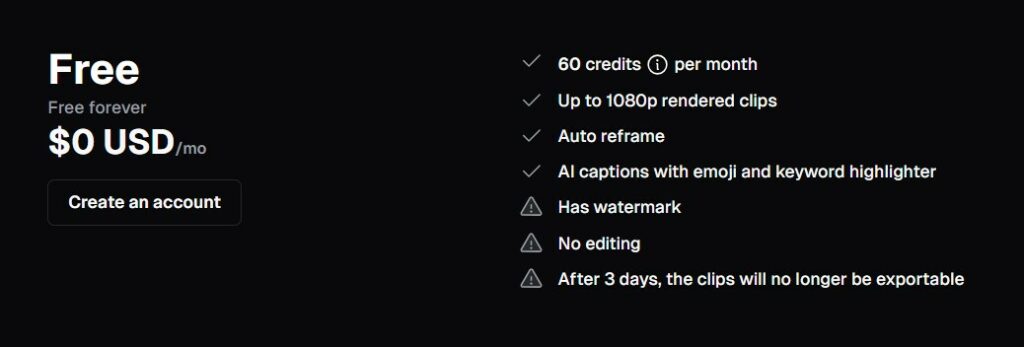
OpusClip lists a Free plan with 60 credits per month, watermark, no editing, and clips that stop being exportable after 3 days.
On some OpusClip pages, it also describes the free plan as 60 minutes of video processing time refreshed monthly.
Starter
Starter is listed at $15 per month and includes 150 credits monthly, AI clipping with Virality Score, animated captions in 20 plus languages, autopost or download, filler and silence removal, and watermark removal.
Pro
Pro is listed at $29 per month, with an annual option shown as $174 billed annually and 3,600 credits per year. It also includes a team workspace (2 seats), more brand templates, social connections, AI B roll, multiple aspect ratios, a scheduler, and export options for Premiere Pro and DaVinci Resolve.
Business
Business is custom pricing with API and custom integrations, priority processing, and tailored brand assets.
Free trial
OpusClip states new users can get a 7 day free trial of the Pro plan, described as 90 minutes of video processing time (about 30 downloadable clips).
Pros and Cons
Pros
Huge time saver if you already have long videos
Captions and reframing cover the basics most beginners struggle with
Virality Score is a helpful sorting tool when you are staring at 20 clips
Pro plan adds practical workflow features like scheduling and editor exports
Cons
You still need to review clips before posting (AI can pick weird cut points)
Captions are good, but brand names and niche terms may need edits
The free plan is limited (watermark, no editing, export time limits)
Who OpusClip is Best For
OpusClip is a strong fit if:
• You record YouTube videos, tutorials, podcasts, livestreams, or trainings
• You want to grow on short form platforms without hiring an editor
• You sell or promote anything that benefits from trust (affiliate tools, courses, services)
It is not the best fit if:
• You do not have any long form video content yet
• You want highly polished cinematic edits
My Simple Recommendation
If you are creating any kind of long form video content in 2026 and you want a realistic way to stay consistent on Shorts, Reels, and TikTok, OpusClip is worth testing.
Start with the free plan or the free trial, run one of your best videos through it, and see if you get at least 5 clips you would actually post. If you do, upgrading usually makes sense because watermark removal, editing, and scheduling are what make this tool feel like a real workflow instead of a fun experiment.
- Frequently Asked Questions
Question: Is OpusClip actually free?
Answer: Yes, OpusClip lists a free plan, but it comes with limits like watermarking and export restrictions.
Question: What is the Virality Score?
Answer: OpusClip describes it as a 0 to 99 score meant to indicate higher likelihood of engagement and shares, and clips can be sorted by it.
Question: Can it post to Shorts, TikTok, and Reels?
Answer: OpusClip lists autopost and scheduling features depending on your plan.


Elizabeth teaches people how to make money online through affiliate marketing. Her tips and strategies help readers earn a Full-Time Income from home. She shares easy steps for success on her blog. Follow her to start your journey!